

Git for Non-Developers: AI-Powered Project Management
THE VISIBILITY PROBLEM NOBODY TALKS ABOUT
Here's a pattern that plays out in almost every company: the development team
ships features on schedule, tracks every change, and can tell you exactly who
modified what, when, and why. Meanwhile, three floors up, the marketing team
is trying to figure out who made the last round of edits to the Q3 campaign
brief — and whether the version in the shared drive is actually the latest one.
This isn't a people problem. It's an infrastructure problem.
Developers solved project visibility decades ago with a combination of source
control (Git), structured workflows (branches, pull requests, code reviews),
and project boards tightly integrated with their actual work. Every change is
recorded. Every decision is traceable. Every version is recoverable.
Business teams — marketing, sales, finance, operations, legal — never got
access to that infrastructure. Not because they didn't need it, but because
it was too technical to use. Until now.
AI agents and MCP are finally making git for non-developers a practical
reality,not just a theory.
AI agents and a protocol called MCP (Model Context Protocol) are removing the
technical barrier entirely. The same Git-powered workflows that keep
engineering teams organized are becoming accessible to everyone — through
natural language, not command lines.
WHY DEVELOPERS DON'T HAVE THIS PROBLEM
Before we talk about solutions, it's worth understanding why software teams
rarely struggle with the visibility issues that plague other departments.
The developer workflow looks something like this:
1. Pick up a task from the project board (Linear, Jira, Azure DevOps)
2. Create a branch — an isolated workspace where changes don't affect anyone
else
3. Make changes, commit them with descriptions of what was done and why
4. Open a pull request — a formal review where teammates see exactly what
changed
5. After review, merge the changes into the main project
6. The task on the board automatically moves to "Done"
Every step in this process creates a record. The project board reflects
reality because it's connected to the actual work, not to someone's memory
of updating a status. If a team member leaves mid-project, their entire
contribution history is preserved — every change, every comment, every
decision.
This isn't magic. It's infrastructure. Specifically, it's Git (for tracking
changes), project boards (for tracking tasks), and tight integration between
the two (so the board reflects what's actually happening in the codebase).
The result? Engineering managers can answer questions like:
- "What's the current status of Feature X?" → Look at the board and the
branch
- "Who worked on this last?" → Check the commit history
- "What changed between last week and now?" → Run a diff
- "Why was this decision made?" → Read the pull request discussion
- "Can we go back to the previous version?" → Revert the commit
Now ask those same questions about your marketing campaign files, your sales
playbooks, your financial models, or your legal contract templates. The answer
is usually a mix of "I think..." and "Let me check with..."
THE SAAS BAND-AID
Business teams aren't oblivious to the visibility problem. They've been
throwing tools at it for years:
ClickUp, Asana, Monday.com, Notion, Trello, Basecamp, Smartsheet — the
project management SaaS market is worth over $6 billion and growing. Every
company has at least one, often several.
But here's what these tools actually do: they track tasks, not work. They give
you a board with columns — To Do, In Progress, Done — and rely entirely on
humans to move cards between them. The moment someone forgets to update their
status (which is most of the time), the board becomes fiction.
Worse, these tools are disconnected from where the actual work happens. The
document lives in Google Drive. The conversation happened in Slack. The
feedback came via email. The final version was attached to a Teams message.
The status board says "In Progress" while the reality is scattered across
five different platforms.
Compare this to what developers have: their project board updates
automatically when code is committed. A pull request moves the task to
"In Review." A merge moves it to "Done." The board never lies because it's
driven by actual events, not manual clicks.
The gap isn't about discipline. It's about whether the system tracks work
for you or expects you to track work for it.
THE BARRIER THAT KEPT EVERYONE OUT
If source control is so effective, why haven't business teams adopted it?
The honest answer: because Git is genuinely hostile to non-technical users.
To use Git, you traditionally need to:
- Install and configure command-line tools
- Understand concepts like repositories, branches, commits, merges, and
rebases
- Write commands like "git checkout -b feature/q3-campaign-update"
- Resolve merge conflicts when two people edit the same file
- Navigate a terminal interface that was designed by and for engineers
For a marketing manager trying to update a campaign brief, this is absurd.
The learning curve is steep, the terminology is alien, and a single wrong
command can feel catastrophic (even though Git is actually very forgiving —
almost nothing is truly destructive).
Attempts have been made to simplify Git for non-developers — GitHub Desktop,
GitKraken, VS Code's built-in Git UI — but they all still require
understanding the underlying concepts. You're just clicking buttons instead
of typing commands, but you still need to know what "commit," "push,"
"branch," and "merge" mean.
This is why business teams stayed on shared drives, email attachments, and
SaaS task boards. Not because those tools are better, but because they're
familiar. The cost of adoption for proper source control was simply too high.
HOW AI AND MCP CHANGE EVERYTHING
The breakthrough isn't a new GUI for Git. It's not a simplified version of
source control with fewer features. It's something fundamentally different:
an AI agent that understands both Git and human language, and translates
between them.
Here's the technology stack that makes this possible:
AI AGENTS (Claude, GPT, etc.) — Large language models that can understand
natural language instructions and translate them into technical operations.
When you say "save the latest version of the Q3 brief," the agent knows
this means staging the file, creating a commit with a meaningful message,
and pushing it to the repository.
MCP (MODEL CONTEXT PROTOCOL) — A standard protocol that lets AI agents
connect to external tools and services. Think of it as USB for AI: a
universal plug that lets the agent talk to GitHub, Linear, Azure DevOps,
file systems, and other tools through a consistent interface.
MCP SERVERS — Specific connectors that expose a tool's capabilities to the
AI agent. A Linear MCP server lets the agent read and update tasks on a
Linear board. A GitHub MCP server lets the agent create branches, commit
files, and open pull requests. An Azure DevOps MCP server does the same for
Microsoft's ecosystem.
When these pieces come together, a non-technical user can say:
"I've finished updating the sales playbook. Save it, note that I revised
the pricing section, and mark the task as done on our board."
And the AI agent will:
1. Stage the changed file in Git
2. Create a commit with the message "Revised pricing section in sales
playbook"
3. Push the commit to the repository
4. Update the corresponding task in Linear/Azure DevOps to "Done"
5. Optionally create a pull request if the team uses reviews
The user never types a Git command. They never open a terminal. They never
learn what a "commit" is. They just talk to an assistant that handles the
infrastructure silently.
WHAT THIS LOOKS LIKE IN PRACTICE
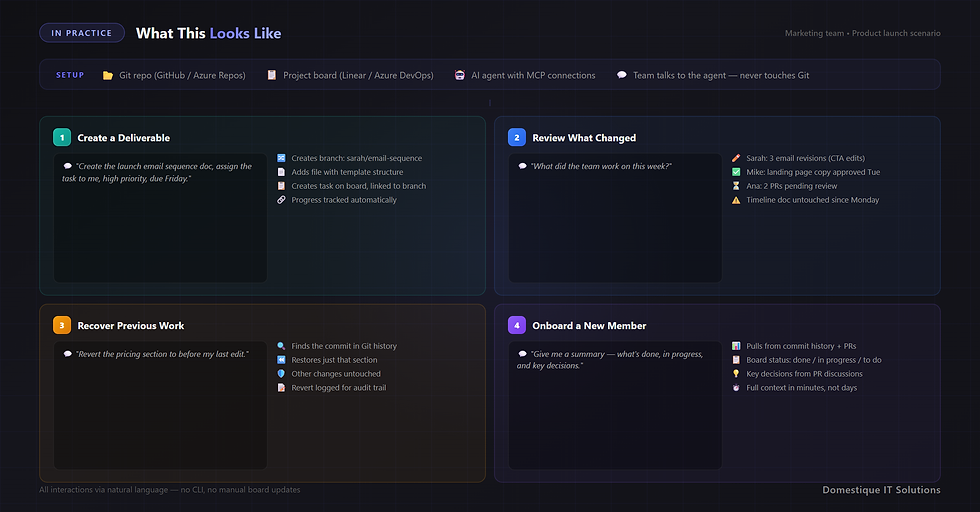
Let's walk through a realistic scenario: a marketing team managing a product
launch using AI-powered source control.
THE SETUP
The team uses:
- A Git repository (GitHub or Azure Repos) for all launch materials:
briefs, copy, assets lists, timelines, budgets
- A project board (Linear or Azure DevOps) for task tracking
- An AI agent (Claude Code, Cursor, or similar) with MCP connections to both
Team members interact with the AI agent through chat or a terminal — they
never touch Git or the project board directly.
SCENARIO 1 — CREATING A NEW DELIVERABLE
Aldona (content lead) tells the agent:
"Create a new document for the launch email sequence. It should go in the
email-campaigns folder. Also create a task for it on our board — assign
it to me, set it as high priority, due next Friday."
The agent:
- Creates a new branch: sarah/launch-email-sequence
- Creates the file in the correct folder with a template structure
- Creates a task on the Linear/Azure DevOps board with the specified details
- Links the task to the branch so progress is tracked automatically
SCENARIO 2 — REVIEWING CHANGES
Stasys (marketing director) asks:
"What did the team work on this week?"
The agent queries the repository and the board, then responds:
"This week, Sarah updated the email sequence (3 revisions — added
personalization tokens and revised the CTA). Mike finalized the landing
page copy (approved by you on Tuesday). The social media calendar has
2 pending pull requests from Ana that haven't been reviewed yet. The
launch timeline document hasn't been touched since last Monday."
This is real visibility — derived from actual work events, not from
someone's memory of what they did.
SCENARIO 3 — RECOVERING PREVIOUS WORK
Aldona realizes the pricing section she updated yesterday was better in its
previous version. She tells the agent:
"Revert the pricing section in the sales playbook to how it was before
my last edit."
The agent checks the Git history, finds the relevant commit, and restores
just that section — without affecting any other changes. Try doing that
with a shared drive.
SCENARIO 4 — ONBOARDING A NEW TEAM MEMBER
A new team member joins mid-project. Instead of spending days catching up
through scattered emails and meetings, they ask the agent:
"Give me a summary of this project — what's been completed, what's in
progress, and what decisions have been made about the messaging."
The agent pulls from the commit history, pull request discussions, and
board status to provide a comprehensive brief. Every decision, every
revision, every approval is recorded and searchable.
THE SCRUM ADVANTAGE — FOR EVERYONE
What makes this approach particularly powerful is that it brings the best
practices of agile software development to non-technical teams:
SPRINTS — Work is organized into fixed time periods. The team commits to
specific deliverables for each sprint. Progress is tracked automatically
through actual work, not status updates.
PULL REQUESTS AS REVIEWS — Instead of emailing documents for feedback,
changes go through pull requests where reviewers can see exactly what
changed, leave comments on specific sections, and approve or request
revisions. The review trail is permanent.
RETROSPECTIVES WITH DATA — At the end of each sprint, the team has real
data: how many tasks were completed, which ones slipped, how many revisions
each deliverable went through, and where bottlenecks occurred. No guesswork.
CONTINUOUS DOCUMENTATION — Because every change is committed with a
description, the project history IS the documentation. There's no need to
maintain a separate status report — the repository tells the story.
This is the system that has made engineering teams productive for two decades.
The only reason it wasn't available to everyone was the technical barrier.
AI removes that barrier.
WHAT CHANGES FOR LEADERSHIP
For managers and executives, AI-powered source control addresses the
question they've been asking for years: "What's actually happening?"
Instead of relying on weekly status meetings where people report what they
remember, leaders can:
- See real progress based on actual work committed
- Track who contributed what, without asking
- Compare current vs. planned timelines with precision
- Identify bottlenecks from data, not anecdotes
- Audit any document's complete history of changes
- Ensure knowledge retention when team members transition
This isn't surveillance. It's the same transparency that engineering teams
have always had — applied to the rest of the organization. The difference
is that it requires zero additional effort from individual contributors.
They just do their work and talk to an AI assistant. The tracking happens
automatically.
THE PRACTICAL REALITY
EASE OF SETUP — Today, configuring an AI agent with MCP connections requires
some technical knowledge. This will get simpler as tooling matures and
managed services emerge.
USER EXPERIENCE — The current interaction model is mostly text-based chat.
As voice interfaces and IDE integrations improve, the experience will feel
more natural for non-technical users.
ORGANIZATIONAL CHANGE — The biggest challenge isn't technical. It's
convincing teams to change how they work. Moving from shared drives and
email attachments to a repository-based workflow requires buy-in, training
(even if minimal), and patience through the transition period.
SECURITY AND GOVERNANCE — Organizations need to think carefully about what
data goes into repositories and who has access. Git repositories keep a
complete history — which is both a feature and a consideration for sensitive
content.
IS THIS RIGHT FOR YOUR TEAM?
This approach makes sense when:
✓ Your team regularly loses track of document versions
✓ Status updates are manual and unreliable
✓ Onboarding new team members takes too long because context is scattered
✓ You spend significant time in status meetings that could be replaced by
real data
✓ Multiple people edit the same documents and step on each other's changes
✓ You want to know not just what was changed, but why
It's probably not worth the effort if:
✗ Your team is very small (2-3 people) and communicates constantly
✗ Your work doesn't involve collaborative documents or deliverables
✗ You're already happy with your current visibility into team progress
✗ You have no tolerance for changing workflows, even with AI assistance
THE BOTTOM LINE
For twenty years, developers have enjoyed a level of project visibility,
change tracking, and collaboration infrastructure that other business
functions could only dream of. The reason was simple: the tools were too
technical for anyone else to use.
AI agents and MCP servers are dissolving that barrier. They don't simplify
Git — they eliminate the need to understand it. A marketing manager, a
finance analyst, or a sales lead can now get the full benefit of source
control, branching, pull request reviews, and automated board updates
without learning a single technical concept.
The question isn't whether this will happen. It's whether your team will
adopt it early and gain the advantage, or wait until it's standard practice
and play catch-up.
Your developers have had this for decades. It's time everyone else did too.
About This Approach
AI-powered source control for non-technical teams combines Git repositories,
project management boards (Linear, Azure DevOps), and AI agents connected
via MCP (Model Context Protocol). The concept is applicable to any team
managing collaborative work products — documents, campaigns, reports, plans,
or any artifacts that benefit from version control and automated tracking.
Domestique IT Solutions builds AI-powered project management solutions using
Microsoft Azure DevOps, GitHub, and modern AI infrastructure.
Comments